I tested 7 open source test reporters, only one worked out of the box
A side-by-side comparison of Allure, Extent Reports, ReportPortal, Monocart, Playwright HTML, Serenity/JS, and TestReport.io across 10 benchmarks; including the ones where my tool loses

Table of Contents
Share
<Summary/>
Most open source test reporters still show raw stack traces on failure. TestReport.io was the only one in this comparison that generates plain English explanations with probable root causes
Four out of seven reporters require Java or Docker as external dependencies. A surprising barrier for JavaScript teams
Setup time varied from under 3 minutes to nearly 45 minutes on a clean machine.
Allure remains the most broadly supported reporter with 15+ framework integrations and 400K+ weekly downloads. Nothing else comes close on ecosystem breadth
The biggest gap in this comparison wasn't speed or UI. It was who can actually read the report. Most reporters are built for engineers, not for the teams deciding what to fix. TestReport.io was built to close that gap.
I spent last week doing something nobody asked me to do. I took the same Playwright test suite and did 12 tests across Chromium, Firefox, and WebKit. Then I ran it through every major open source test reporter I could find. Same project. Same tests. Same machine.
I measured each one on 10 specific benchmarks. Setup steps, external dependencies, config lines, time to first report, and a few things I didn't expect to matter but ended up mattering a lot.
Here's the raw data.
The 7 Reporters I Benchmarked
The industry standard. Massive ecosystem
Java/TestNG ecosystem staple
Enterprise self-hosted reporting platform
Lightweight Playwright reporter
Built into Playwright
BDD-focused reporting framework
The one I built. Open source. AI-powered
<info/>
Full Disclosure
I created TestReport.io. That's the bias. The benchmarks below are the counter to that bias; every number is verifiable, and I included the two categories where my tool comes last
The Methodology
For each reporter, I measured:
Setup Steps: Distinct commands from zero to first report
External Dependencies: Java, Docker, databases required beyond Node.js
Post-Run Commands: Extra commands needed after tests finish to view the report
Time to First Report: Minutes from install to viewing report in browser
AI Failure Explanation: Plain English root cause on failures
AI Step Breakdown: Human-readable test narration
Bug Evidence Download: How accessible are failure screenshots and videos?
One-Click Plugin: Is there a VS Code extension for zero-config report viewing?
Framework Support: Number of test frameworks supported
Community Size: Weekly downloads as a proxy for ecosystem maturity
<Tips/>
Same MacBook. Same Node.js. Same Playwright project. Setup steps and dependencies verified against each tool's official docs. Time estimates based on following each setup from scratch
The Leaderboard
Benchmark | Test | Allure | Extent | Report | Monocart | PW HTML | Serenity |
|---|---|---|---|---|---|---|---|
Setup Steps | 3 | 5-6 | 8+ | 12+ | 3 | 0 | 8+ |
External Deps | None | Java+CLI | Java | Docker + DB + UI | None | None | Java + BDD libs |
Post-run | 1 | 2 | Build report | Multiple | 0 | 0 | 2 |
Time to | ~3 mins | ~7 mins | ~25 mins | ~45 mins | ~3 mins | ~1 min | ~30 mins |
AI failure | Yes | No | No | Partial (ML) | No | No | No |
AI step | Yes | No | No | No | No | No | No |
Bug evidence download | Inline per test | In-report | Manual | in UI | in-report | in-report | in-report |
One-click plugin | Yes | No | No | No | No | No | No |
Framework support | 2 | 15+ | 5+ | 10+ | 1 | 1 | 3 |
Community (weekly DL) | Growing | 400k+ | N/A | 10k+ | 15k+ | Built-in | 5k+ |
<info/>
TestReport.io
It wins cleanly on 4 benchmarks that no other tool can match (AI explanation, AI steps, VS Code plugin, inline bug evidence). Ties Monocart on setup speed and zero dependencies. Beats Allure on post-run workflow and external deps. Loses on framework support and community size
The 4 it wins on are the ones that didn't exist as benchmarks until now. That's the point. Now let me break down each one
Setup Steps
This is where most reporters lose people before they start
1. Allure
It needs Java 8+ with JAVA_HOME configured. It's a prerequisite before you install anything. Then npm install allure-playwright. Add reporter to your config. Run tests
But you're not done; Allure writes raw JSON to a results folder, so you need a separate allure generate command to build the HTML, then allure serve to view it
If Java is already on your machine, that's 5 steps. If it's not, you're looking at 6 because Java setup on a fresh machine is not a one-click affair
2. Extent Reports
It is Java-native. For Playwright you need pom.xml dependencies, TestNG listener integration, ExtentManager and ExtentTestManager classes, and SuiteBase configuration. 8+ steps before you see anything
3. ReportPortal
It requires Docker, a PostgreSQL database, and the ReportPortal UI service running. 12+ steps. 45 minutes on a fresh machine
4. Monocart
It needs 3 steps: install, add to config, run tests. The report auto-opens
5. TestReport.io
It also needs 3 steps. Install. Config. Run and serve
One line in your playwright config:
Run tests, start dashboard:
The step count between Monocart and TestReport.io is similar. The difference shows up in what happens after TestReport.io gives you AI insights on every test. Monocart gives you a static HTML report. But purely on setup, both are fast
Where the real gap opens is against Allure, Extent, ReportPortal, and Serenity. All of which need external runtimes (Java or Docker) that a JavaScript team shouldn't have to install just to read test results
External Dependencies
Allure needs Java 8+ with JAVA_HOME configured. Every CI runner, every developer machine, every new hire needs it. For a JavaScript/TypeScript team, that's a foreign runtime just to see test results
ReportPortal needs Docker, PostgreSQL, and its own UI service. That's infrastructure to maintain, not a dev tool to install
Extent Reports and Serenity need Java
TestReport.io, Monocart, and Playwright HTML need nothing outside Node.js. npm install and you're done. I made this a hard requirement when building TestReport.io. If your team runs JavaScript, your reporter should run on JavaScript. No exceptions
Post-Run Commands
This is a workflow difference that matters every single day
With Allure, running your tests is not the last step
After npx playwright test, Allure writes raw JSON files to a results directory
You then need to run allure generate allure-results --clean to build the HTML report, and then allure serve or allure open to view it. Two extra commands, every time
Serenity/JS has the same pattern, generate then open
ReportPortal sends data to its server during the test run, but you need the server running first, and you navigate to its UI separately
Playwright HTML and Monocart auto-generate. Zero post-run commands. You run tests and the report is there
TestReport.io needs one post-run command: npx playwright-viewer serve. It starts a local dashboard at localhost:4173. One command, not two. And unlike the generate-then-serve pattern, there's no intermediate build step, the dashboard reads directly from the test output
The difference between one command and two doesn't sound like much. Multiply it by every test run, every CI pipeline, every developer on your team. It adds up
Time to First Report
Estimated based on following each tool's official setup docs on a clean machine:
Playwright HTML: ~1 min (built in, nothing to install)
TestReport.io: ~3 min (npm install, config, run, serve)
Monocart: ~3 min (same complexity, auto-opens)
Allure (Java pre-installed): ~7 min (install packages, config, run, generate, serve)
Allure (no Java): ~15+ min (Java install + JAVA_HOME adds real time)
Extent Reports: ~25 min (Java ecosystem setup, multiple class files)
Serenity/JS: ~30 min (Java 11+, BDD setup, dependency resolution)
ReportPortal: ~45 min (Docker, database, services, project config)
Most JavaScript teams don't have Java pre-installed. That's the reality Allure's ~7 minute best case doesn't account for
AI Failure Explanation
The Benchmark That Started Everything. This is why TestReport.io exists. This is the problem I was trying to solve
When a test fails in Allure, you see:
That's useful if you wrote the test. It's useless for everyone else
When the same test fails in TestReport.io, you see:
WHAT WENT WRONG
The test failed because it waited for something to happen, but it never did. The test was trying to verify that something is correct or appears as expected. It was waiting for the element to appear or become ready, but it never did
This usually means:
The website was very slow to respond,
The element the test was looking for was removed or changed,
The page got stuck loading,
There was a network problem.
A product manager can read that. A client can read that. A QA lead scanning 200 failures at 6 PM on a Friday can prioritize without reading code
I built this because I was tired of being a translator between test results and the people who needed to act on them. Every failure report my team sent to clients required a follow-up call to explain what the stack trace actually meant. TestReport.io is that follow-up call, automated
No other open source reporter does this. I checked all of them
AI Step-by-Step Breakdown
TestReport.io generates a human-readable narrative for every test which passed or failed:
Step-by-step breakdown
Setting up the test environment; preparing everything needed for the test to run smoothly (took 0.52 seconds)
Opening the webpage "/", loading the website in the browser (took 0.67 seconds)
Verifying that "an element" meets the expected condition, checking if everything is correct (took 0.05 seconds)
Cleaning up after the test, closing browsers, clearing data, and resetting the environment (took 0.20 seconds)
Other reporters show
page.goto('/')andexpect(locator).toBeVisible(). That's code. TestReport.io translates code into a story anyone can follow.
This matters when the person reading the report didn't write the test. In most teams, that's most people
Bug Evidence Download
Every reporter shows screenshots and videos. The difference is where they show them
In Allure, you click into an individual test, navigate to the attachments tab, and download from there. It works. But when you're triaging 50 failed tests, that's a lot of clicking
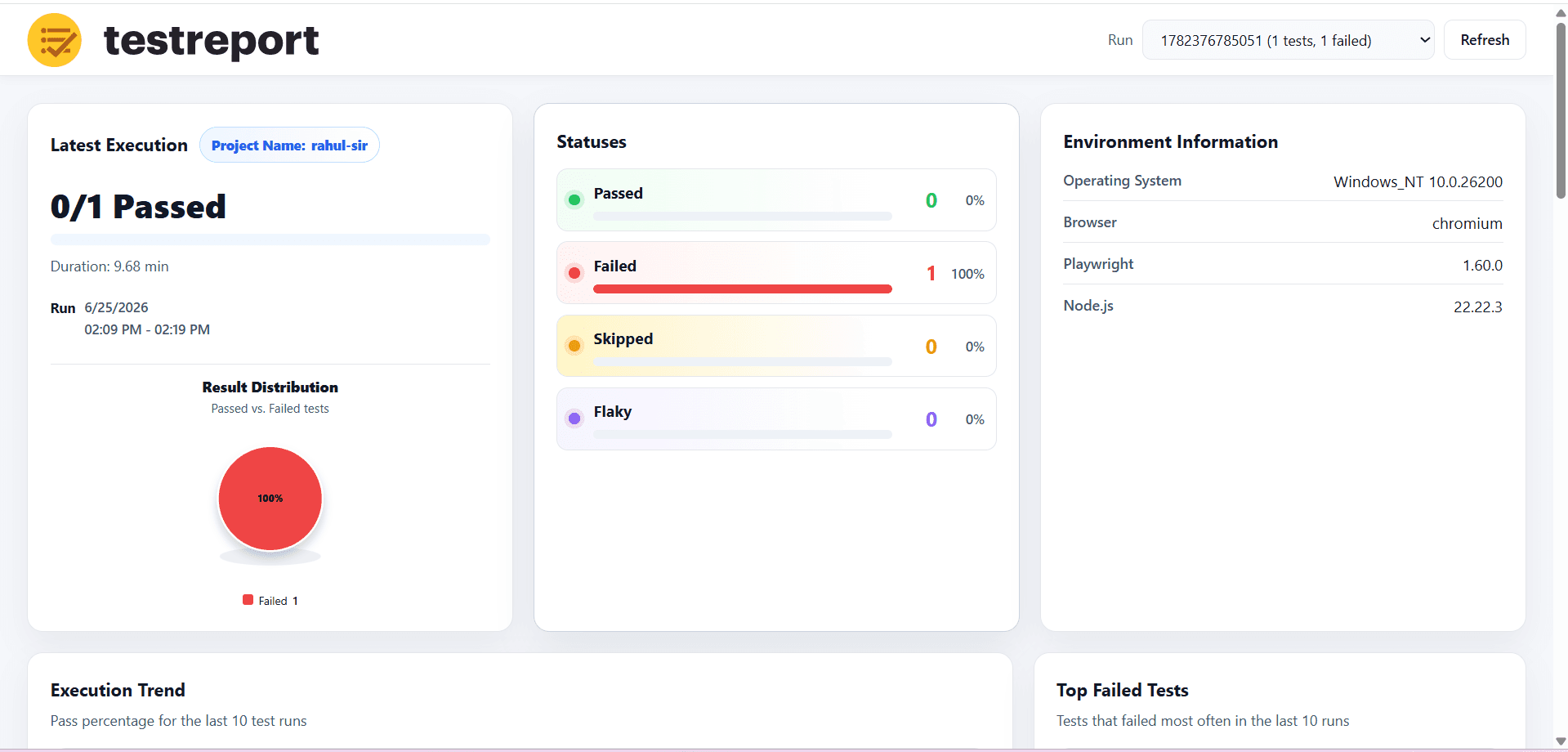
TestReport.io shows screenshot, video, and error-context links inline in the test list view, right next to each failed test
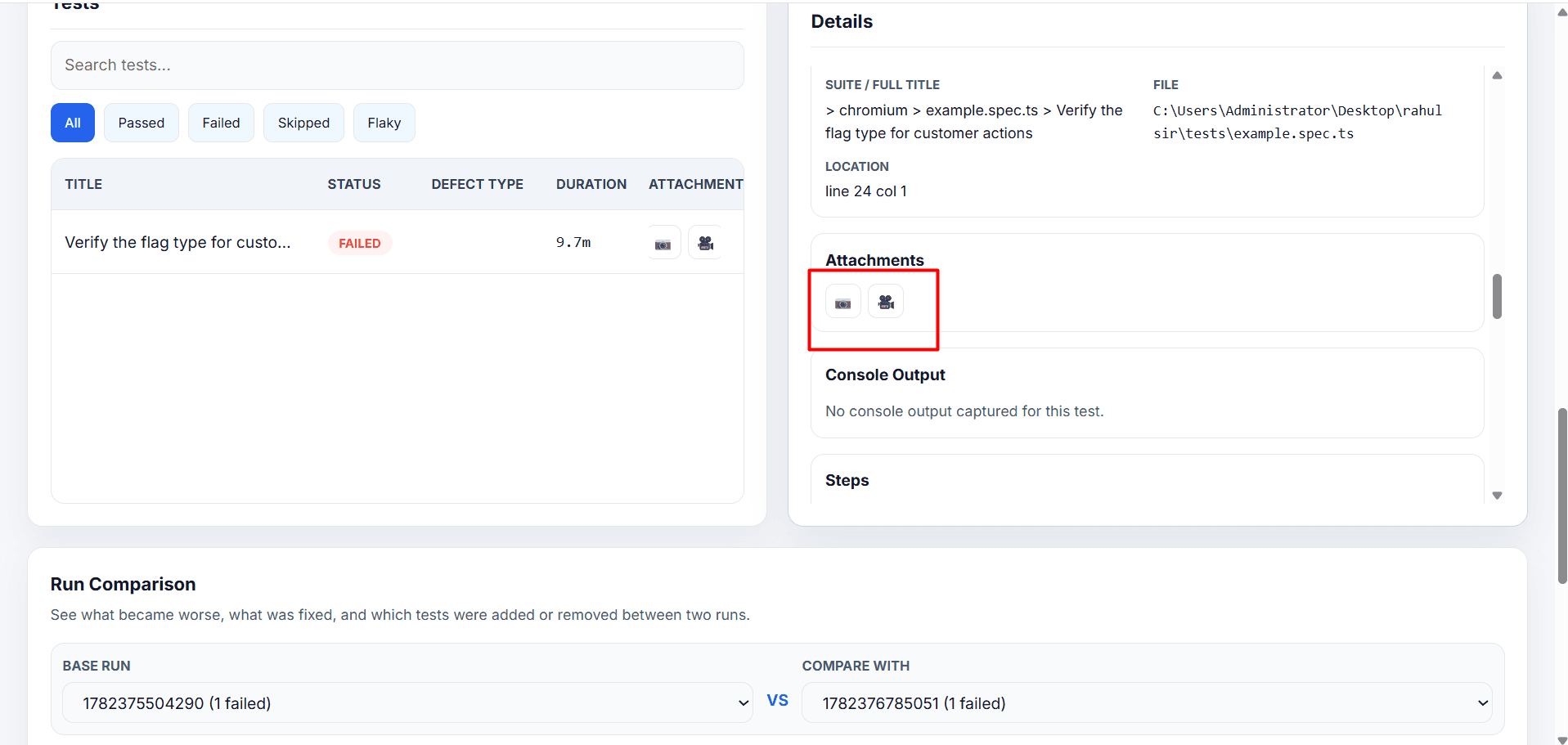
You don't navigate into the test to find the evidence. It's there in the same view where you're scanning results. One click to download. Save the failure video and attach it to your Jira ticket without leaving the dashboard
Both tools technically let you download evidence. The workflow difference is how many clicks it takes across a large failure set
One-Click Plugin
TestReport.io has a VS Code extension. Install it from the marketplace and view reports directly inside your editor. No terminal commands. No switching windows. Your test results live where your code lives
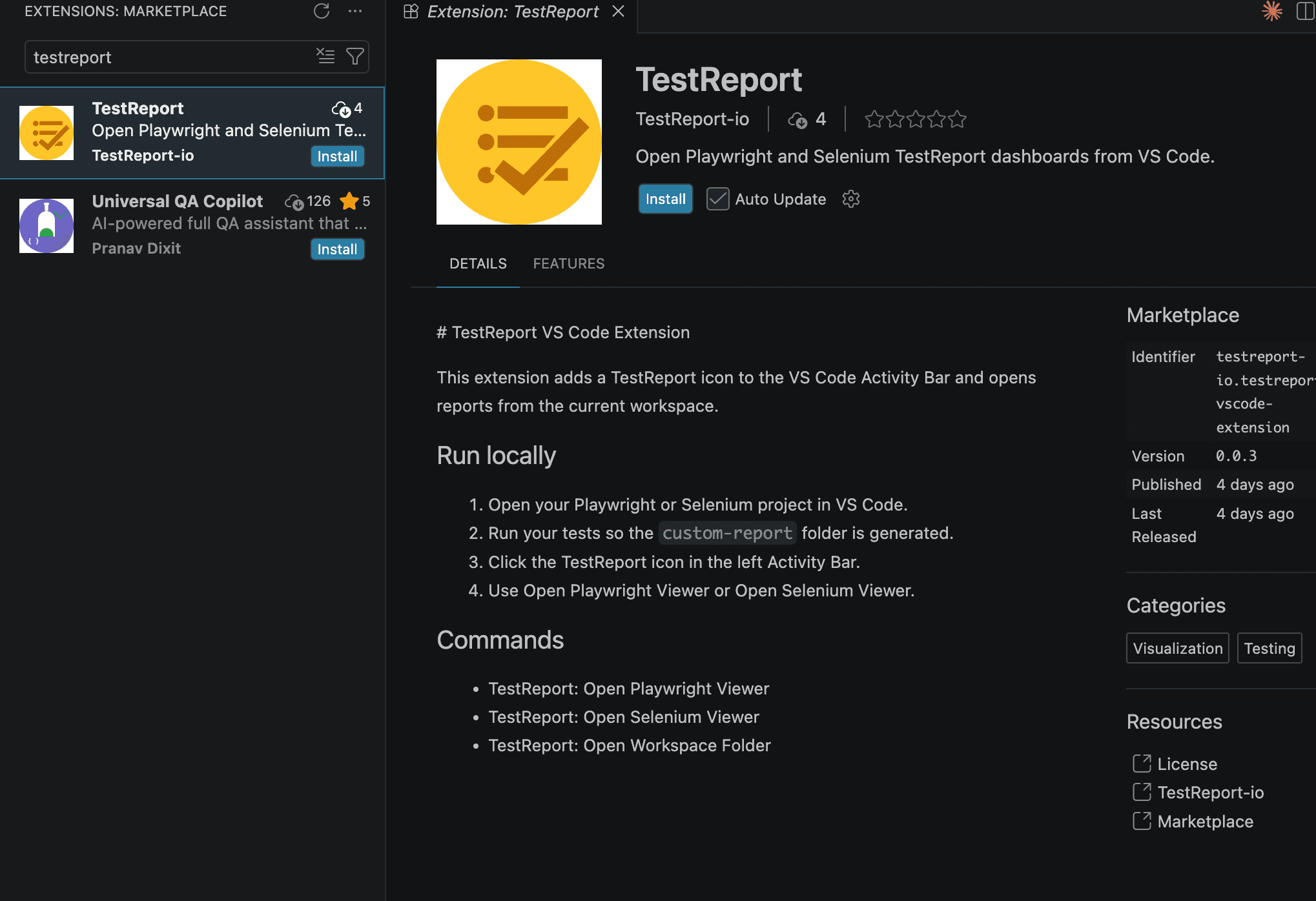
None of the other 6 offer this. Allure requires CLI commands to generate and serve. ReportPortal needs a running server. Monocart auto-opens but still starts from terminal
I built the plugin because the report should come to you, not the other way around. You finish a test run, click once in VS Code, and the dashboard is right there. No context switching
Where TestReport.io loses
I said I'd be honest. Here it is
Framework Support
Allure supports 15+ frameworks. Playwright, Selenium, TestNG, JUnit, Pytest, Cucumber, Cypress, and more. If your organization runs Selenium in Java and Playwright in TypeScript, Allure gives you one reporting format across both
TestReport.io currently supports Playwright and Selenium. That covers the majority of modern QA teams, but it doesn't cover everyone. Multi-framework enterprises will find Allure's breadth unmatched
I'm working on expanding framework support. But today, Allure wins this benchmark
Community Size
Allure has 400K+ weekly NPM downloads for the Playwright package alone. Extent Reports has decades of Java ecosystem adoption through Maven. ReportPortal runs in Fortune 500 companies
TestReport.io has 852 total NPM downloads. That's not a typo. We're early
If proven ecosystem and long-term stability are your top criteria, the established tools have the edge. I'd rather be honest about that than pretend 852 downloads competes with 500K
What I can tell you is that the 852 people who did install it didn't need to install Java first
The Setup: Side by Side
Allure Report
TestReport.io
No Java. No CLI tools. No generate step.
Why Open Source
Allure is an incredible tool. I've used it for years. But every Allure report I sent to a non-technical stakeholder needed a follow-up Loom video explaining what the failures actually meant
TestReport.io is that Loom video, built into the report
I made it open source because the QA community gave me Playwright, Selenium, and every other tool I've ever used for free. This is how I give back
If the benchmarks convince you, try it:
If they don't, I've at least given you an honest comparison of 7 reporters that might help you pick the right one for your team. That's a win either way
Open Source: https://github.com/rahul1818/Testreport-io
NPM: https://www.npmjs.com/package/testreport.io-io
Cloud Version (AI Insights): https://testreport.io
Built by the team at PerfectQA. Currently supports Playwright and Selenium. More frameworks coming.
Tried it? Have feedback? Drop a comment or open an issue on GitHub
Why choose PerfectQA services
At PerfectQA, automation is not just about speed — it’s about assurance. We combine framework expertise, proactive analysis, and audit-driven reporting to deliver testing solutions that scale with your business
Expertise and Experience: 15+ years in automation and regression testing across multiple industries
Customised Frameworks: We adapt to your tech stack, not the other way around.
State-of-the-Art Tools: Selenium, Playwright, Cypress, and CI/CD integrations.
Proactive Support: Continuous improvement through audit and debugging
About PerfectQA
PerfectQA is a global QA and automation testing company helping businesses maintain flawless software performance through manual, automated, and hybrid testing frameworks
Our mission
Deliver precision, speed, and trust with every test cycle
Learn more about our solutions
Want flawless automation?
Schedule your free test strategy consultation today and see how PerfectQA can help you achieve continuous quality at scale
Stories you could call yourn Own
Solutions and frameworks that scales with teams of any size in any industry